Import Bank Statements
Import the statement files from online banking, review the recognized lines, and prepare them for reconciliation.
Finance → Bank Statements turns a statement downloaded from online banking into bank lines that you then match to invoices and supplier documents.
You need: the Finance permission and the company bank account set up under Settings → Bank Accounts.
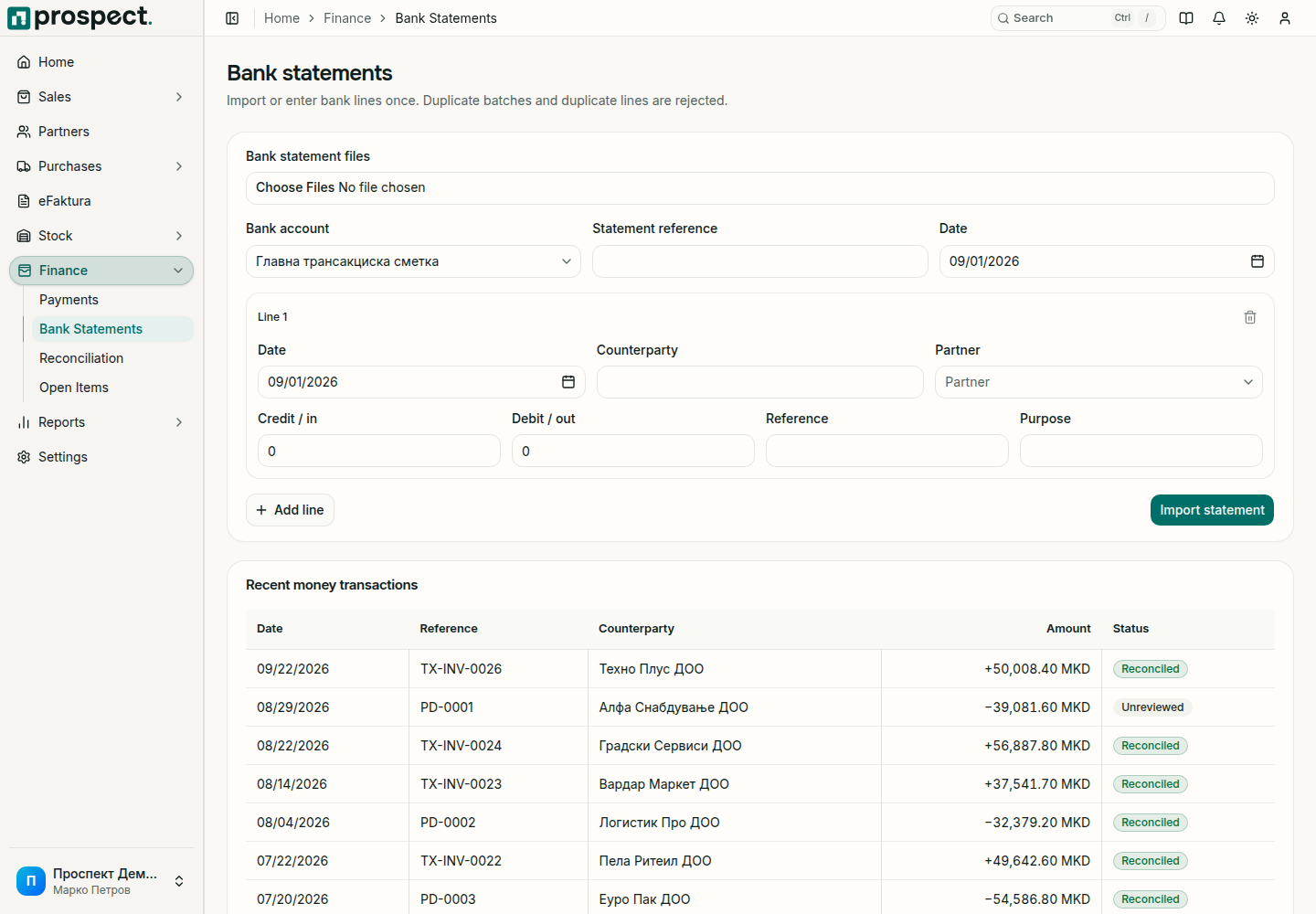
Import a statement
Download the statement from online banking in one of the supported formats.
Open Finance → Bank Statements. Under Bank statement files, choose the file, or all files of one statement together.
Select the Bank account. If the account number in the file differs from the selected account, Prospect stops and tells you.
Review the lines Prospect prepared: date, Counterparty, Credit / in, Debit / out, Reference and Purpose. Select the Partner on a line when you already know it. Remove a line that does not belong, or use Add line to enter one by hand.
Check the Statement reference and Date, then choose Import statement.
Open Reconciliation to match the new lines.
You can also enter a statement entirely by hand: leave the file chooser empty, fill in the lines, and import.
Supported formats
| Format | Notes |
|---|---|
| ISO 20022 camt.053 (XML) | The standard XML statement. |
| SWIFT MT940 | Text statement. Partner and purpose are read from the details field. |
| Format .300 | The fixed-width statement download used in Macedonian online banking. Verified with Komercijalna Banka. |
| CSV | A delimited export with a header row for date, amount, and description. |
Komercijalna Banka delivers one Format .300 statement as several files: a header file and one or more files with the transactions. Select them together in the same import so that they become one statement. Files for a different account, date, or format cannot be combined.
Format .300 files from other banks have not been verified. The first time you import from another bank, or in a format you have not used before, compare every line with the bank's own statement before you import, and report differences to support.
Limits and safeguards
- Each file may be up to 5 MB, and all files chosen together up to 10 MB.
- Prospect keeps the bank lines, not the files. Keep the original files outside Prospect according to company policy.
- A statement or a line that was already imported is rejected, so importing the same file twice does not double your bank lines.
- Do not re-import transactions to repair a wrong match. Reverse the match in Reconciliation instead.
Do not include online-banking passwords, card numbers, or authentication codes in uploaded files or support requests.